
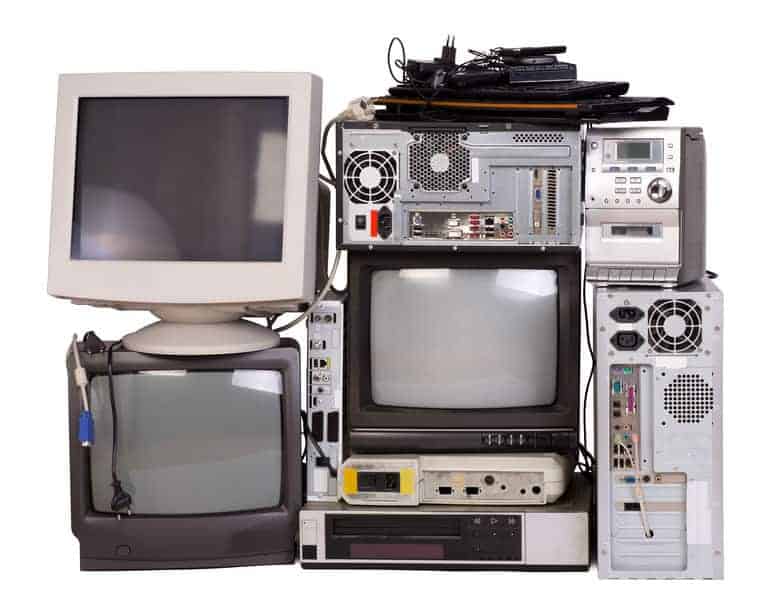
You Paid How Much for Your First Computer?!


I just read something that made me laugh out loud—mostly because it’s funny, but also because it is poignantly true.
“I wonder what my kids will tell their kids … ‘It was so rough back in my day. I didn’t get a phone ’til 4th grade and sometimes the wifi didn’t always work upstairs!’”
You’re laughing too, aren’t you! I want to add one more thing: “And back then, a computer cost more than a thousand dollars!” I can visualize those future kids, slack-jawed at the thought of having to pay that much money for a computer. Unthinkable. Right? Do you recall how much your first computer cost?
Over the years, I have owned no fewer than eight nine computers—mostly because I just beat them to death. But also because I’ve convinced myself that I need to be on the cutting edge of technology as a writer.
Slow, expensive relics
My first computer was the biggest, the heaviest, the slowest, and the most expensive of all nine. I welcomed a lighter, sleeker, faster, and better machine with each upgrade. But here’s the surprising thing: Each new computer would cost less than the one it replaced. Technology is wonderful that way.
Speaking of wonderful, there is no other way to describe what is happening in the world of Chromebook—a laptop computer that runs Chrome OS as its operating system is designed to be used primarily while connected to the Internet and costs anywhere from about $200 to $900. Even the higher-end models are at least $2,000 cheaper than a Macbook Pro with Retina display.
Several companies such as Lenovo, Acer, HP, Samsung, Asus, and Toshiba are manufacturing Chromebooks because they have become so popular. In fact, Chromebooks have outsold Apple’s range of Macs.
Popular with college students
Chromebooks are super popular with college students because they’re portable, lightweight, reliable and the best part—all of their files, documents, notes, music, videos, movies, etc., are stored online and available from anywhere on any device.
A Chromebook is a specific type of laptop computer that relies heavily on the Google suite of applications. And it doesn’t have a ton of onboard storage, with most apps and documents living in the cloud rather than in the machine’s hard drive—which if you’ve ever had a hard drive crash, should come as really good news.
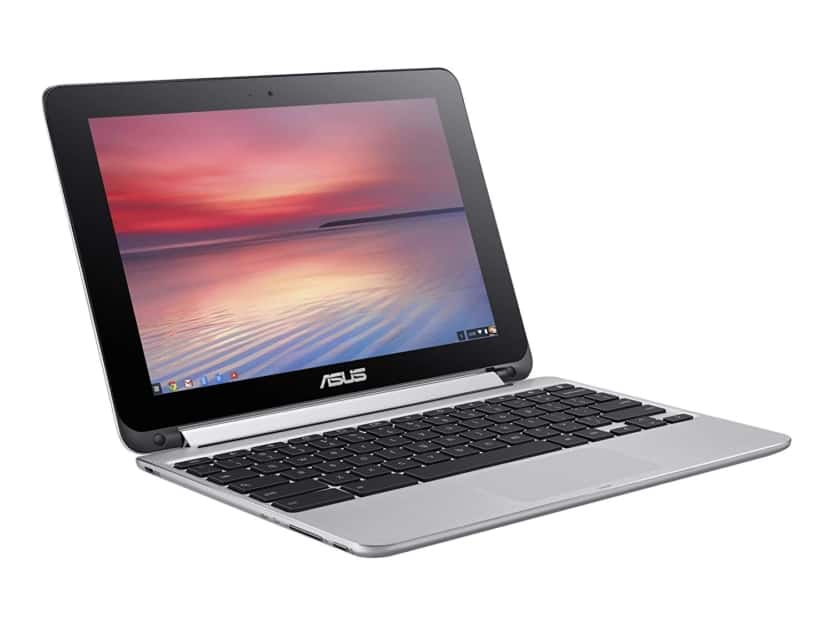
For me, the most amazing thing about a Chromebook is the price. For example, this ASUS Chromebook Flip can be used as a laptop or flipped over to become a tablet. It has an HD touchscreen, 10.1-inch screen, 10-hour battery life, 2.0 GHz processor, 4 GB memory and 16 GB eMMC storage. And today it costs less than ten percent of what I paid for my first computer.
What’s the difference between Chromebooks and other traditional computers that run on Windows or Mac OS?
Chromebooks are designed to be used primarily while connected to the Internet. Most applications and documents live in the cloud rather than being downloaded or installed on the machine itself.
But aren’t Chromebooks inferior to regular computers, designed mostly for kids?
Not any more. In fact, industry experts are now saying the best Chromebooks are some of the best laptops overall. Chromebooks have come a long way!
Is Chromebook an option for college student?
Perhaps a Chromebook is a better option than a pricey Macbook because most schools have computer labs that provide a better atmosphere for studying.
A Chromebook can easily fulfill any gaps a student might have with his or her use of the college’s computer lab. Chromebooks are lightweight, they run Flash, and email. Students can use Google Drive to have colleagues edit easily and to submit papers. A Chromebook allows them to read academic articles, browse social media, or conduct other “recreational” research.
Generally, Chromebooks can run anything that uses Flash, which is what most online and offline applications for his or her classes will be using. Check your student’s computer requirements to ensure a Chromebook can run the necessary applications or tools.
Do Chromebooks work offline when there is no Internet connection available?
Yes, but in a limited way. With the Internet and wifi so available these days, it’s rarely a consideration. Still, with a few offline-ready apps, you can:
- Read and write emails with the app Offline Gmail
- Take notes or make a list with Google Keep
- You can create and edit documents, spreadsheets, and slides with Google Drive
- View and even edit photos if you’ve saved them with the Chromebook’s built-in photo editor
- Listen to music or watch movies with the built-in media player
Do Chromebooks have CD/DVD drives?
No, but you can play saved music and watch movies with the built-in media player. Or you can play files from a USB drive or SD card.
Can I print from a Chromebook?
Yes, by either setting up your printer on your Chromebook or setting up Google Cloud Print.
Could I use any accessories with a Chromebook?
Mac and Windows USB drives work with Chromebooks. So do computer mice, keyboards and external storage devices.
Is a Chromebook right for everyone and every situation?
I am not planning to get rid of my MacBook Pro anytime soon, so the answer is no, but I love my Chromebook. It’s compact, sleek, lightweight, and has a full-size keyboard.
I can take it with me to keep up with email. It’s perfect for browsing the Internet, creating documents, taking notes, which I save to my Google docs. I count on it for handling email, listening to music, and even playing a game. Or ten.
Add to all that the cheap price, and it’s no wonder Chromebook laptops have become so popular.
First published: 5-25-16; Revised & Updated with expanded information for 2019: 8-29-19. Last modified 8-3-22.
Everyday Cheapskate participates in the Amazon Services LLC Associates Program, an affiliate advertising program designed to provide a means for us to earn fees by linking to Amazon-affiliated sites.

More from Everyday Cheapskate
 https://www.everydaycheapskate.com/wp-content/uploads/when-to-file-an-insurance-claim.png
800
1200
Mary Hunt
https://www.everydaycheapskate.com/wp-content/uploads/EC-Logo-by-Mary-Hunt-Tagline-Trimmed.png
Mary Hunt2026-10-29 12:47:092026-10-29 12:49:44Small Insurance Claim? 5 Questions to Ask Before You File
https://www.everydaycheapskate.com/wp-content/uploads/when-to-file-an-insurance-claim.png
800
1200
Mary Hunt
https://www.everydaycheapskate.com/wp-content/uploads/EC-Logo-by-Mary-Hunt-Tagline-Trimmed.png
Mary Hunt2026-10-29 12:47:092026-10-29 12:49:44Small Insurance Claim? 5 Questions to Ask Before You File https://www.everydaycheapskate.com/wp-content/uploads/20261025-Simple-anti-aging-skincare-routine-with-cleanser-vitamin-C-moisturizer-and-sunscreen.png
800
1200
Mary Hunt
https://www.everydaycheapskate.com/wp-content/uploads/EC-Logo-by-Mary-Hunt-Tagline-Trimmed.png
Mary Hunt2026-10-25 17:06:382026-10-25 21:22:53A Simple Anti-Aging Skincare Routine That Makes Sense
https://www.everydaycheapskate.com/wp-content/uploads/20261025-Simple-anti-aging-skincare-routine-with-cleanser-vitamin-C-moisturizer-and-sunscreen.png
800
1200
Mary Hunt
https://www.everydaycheapskate.com/wp-content/uploads/EC-Logo-by-Mary-Hunt-Tagline-Trimmed.png
Mary Hunt2026-10-25 17:06:382026-10-25 21:22:53A Simple Anti-Aging Skincare Routine That Makes Sense https://www.everydaycheapskate.com/wp-content/uploads/20261024-A-cup-of-coffee-notebook-and-pen-on-a-table.png
800
1200
Mary Hunt
https://www.everydaycheapskate.com/wp-content/uploads/EC-Logo-by-Mary-Hunt-Tagline-Trimmed.png
Mary Hunt2026-10-24 13:13:592026-10-24 13:13:59What Is Frugal Living? It’s Probably Not What You Think
https://www.everydaycheapskate.com/wp-content/uploads/20261024-A-cup-of-coffee-notebook-and-pen-on-a-table.png
800
1200
Mary Hunt
https://www.everydaycheapskate.com/wp-content/uploads/EC-Logo-by-Mary-Hunt-Tagline-Trimmed.png
Mary Hunt2026-10-24 13:13:592026-10-24 13:13:59What Is Frugal Living? It’s Probably Not What You Think https://www.everydaycheapskate.com/wp-content/uploads/20261023-Paper-calendar-and-digital-calendar-on-a-smartphone-side-by-side.png
800
1200
Mary Hunt
https://www.everydaycheapskate.com/wp-content/uploads/EC-Logo-by-Mary-Hunt-Tagline-Trimmed.png
Mary Hunt2026-10-23 11:55:302026-10-23 11:55:30Paper or Digital Calendar? Turns Out, You May Need Both
https://www.everydaycheapskate.com/wp-content/uploads/20261023-Paper-calendar-and-digital-calendar-on-a-smartphone-side-by-side.png
800
1200
Mary Hunt
https://www.everydaycheapskate.com/wp-content/uploads/EC-Logo-by-Mary-Hunt-Tagline-Trimmed.png
Mary Hunt2026-10-23 11:55:302026-10-23 11:55:30Paper or Digital Calendar? Turns Out, You May Need Both https://www.everydaycheapskate.com/wp-content/uploads/20261017-Woman-opening-refrigerator-stocked-with-fresh-food-and-condiments.png
800
1200
Mary Hunt
https://www.everydaycheapskate.com/wp-content/uploads/EC-Logo-by-Mary-Hunt-Tagline-Trimmed.png
Mary Hunt2026-10-17 12:16:242026-10-17 12:16:24What Temperature Should a Refrigerator and Freezer Be?
https://www.everydaycheapskate.com/wp-content/uploads/20261017-Woman-opening-refrigerator-stocked-with-fresh-food-and-condiments.png
800
1200
Mary Hunt
https://www.everydaycheapskate.com/wp-content/uploads/EC-Logo-by-Mary-Hunt-Tagline-Trimmed.png
Mary Hunt2026-10-17 12:16:242026-10-17 12:16:24What Temperature Should a Refrigerator and Freezer Be? https://www.everydaycheapskate.com/wp-content/uploads/20261012-Woman-using-smartphone-while-checking-monthly-cellular-data-usage-on-laptop.png
800
1200
Mary Hunt
https://www.everydaycheapskate.com/wp-content/uploads/EC-Logo-by-Mary-Hunt-Tagline-Trimmed.png
Mary Hunt2026-10-12 10:51:112026-10-12 10:51:11Do You Really Need Unlimited Data? Check Before You Pay
https://www.everydaycheapskate.com/wp-content/uploads/20261012-Woman-using-smartphone-while-checking-monthly-cellular-data-usage-on-laptop.png
800
1200
Mary Hunt
https://www.everydaycheapskate.com/wp-content/uploads/EC-Logo-by-Mary-Hunt-Tagline-Trimmed.png
Mary Hunt2026-10-12 10:51:112026-10-12 10:51:11Do You Really Need Unlimited Data? Check Before You Pay https://www.everydaycheapskate.com/wp-content/uploads/20261011-Woman-Adjusting-Smart-Home-Device-on-the-Wall-how-to-lower-your-electric-bill.png
800
1200
Mary Hunt
https://www.everydaycheapskate.com/wp-content/uploads/EC-Logo-by-Mary-Hunt-Tagline-Trimmed.png
Mary Hunt2026-10-11 23:01:562026-10-11 23:01:56Stop Chasing Pennies on Your Electric Bill. Do This
https://www.everydaycheapskate.com/wp-content/uploads/20261011-Woman-Adjusting-Smart-Home-Device-on-the-Wall-how-to-lower-your-electric-bill.png
800
1200
Mary Hunt
https://www.everydaycheapskate.com/wp-content/uploads/EC-Logo-by-Mary-Hunt-Tagline-Trimmed.png
Mary Hunt2026-10-11 23:01:562026-10-11 23:01:56Stop Chasing Pennies on Your Electric Bill. Do This https://www.everydaycheapskate.com/wp-content/uploads/20261007-red-present-sitting-in-autumn-leaves-Amazon-Prime-Big-Deal-Days-gifts.png
800
1200
Mary Hunt
https://www.everydaycheapskate.com/wp-content/uploads/EC-Logo-by-Mary-Hunt-Tagline-Trimmed.png
Mary Hunt2026-10-06 23:09:432026-10-06 23:09:43Christmas Shopping in October? These Prime Day Gifts Make Sense
https://www.everydaycheapskate.com/wp-content/uploads/20261007-red-present-sitting-in-autumn-leaves-Amazon-Prime-Big-Deal-Days-gifts.png
800
1200
Mary Hunt
https://www.everydaycheapskate.com/wp-content/uploads/EC-Logo-by-Mary-Hunt-Tagline-Trimmed.png
Mary Hunt2026-10-06 23:09:432026-10-06 23:09:43Christmas Shopping in October? These Prime Day Gifts Make Sense https://www.everydaycheapskate.com/wp-content/uploads/20261006-prime-big-deal-days-have-landed.png
800
1200
Mary Hunt
https://www.everydaycheapskate.com/wp-content/uploads/EC-Logo-by-Mary-Hunt-Tagline-Trimmed.png
Mary Hunt2026-10-05 11:01:432026-10-07 09:02:53EC’s Top Picks from Amazon Prime Big Deal Days 2026
https://www.everydaycheapskate.com/wp-content/uploads/20261006-prime-big-deal-days-have-landed.png
800
1200
Mary Hunt
https://www.everydaycheapskate.com/wp-content/uploads/EC-Logo-by-Mary-Hunt-Tagline-Trimmed.png
Mary Hunt2026-10-05 11:01:432026-10-07 09:02:53EC’s Top Picks from Amazon Prime Big Deal Days 2026

How is your personal banking handled on Chromebook?. I pay all my bills online.
While the Chromebook is a good deal, but readers should be aware that for the price Google collects data on the users, including kids, and sells it to people interested in influencing your purchases and your votes. Just search the internet on “Chromebook spying”, but don’t use Google for the search. Instead try a web search engine that doesn’t track your searches like duckduckgo.com.
I bought an Acer Chromebook in March 2014. I received this message last week, “You have received your final update. We update Chromebooks for approximately 6.5 years. We recommend you upgrade in the near future.” Hmm. Now Chromebooks are disposable? They need to work on their math. My 6.5 years are not up. I also don’t know how long I can trust this “final update” to protect me. Like you said, “Chromebooks are not for everyone.”
We bought an XT with a color monitor and a dot matrix printer for $3,000 in 1985. We were on Prodigy and the only people I knew with email addresses were my kids, 6, 8 and 11 years old. I was a Federal employee and we did not have PCs at our desks and word processing was still being done on a stand-alone word processor.
Here is a newer model of this item mentioned in your vlog.
ASUS Chromebook Flip C101PA-DB02 10.1inch Rockchip RK3399 Quad-Core Processor 2.0GHz, 4GB Memory,16GB, All Metal Body,Lightweight, USB Type-C, Google Play Store Ready to run Android apps, Touchscreen
ASUS Chromebook Flip C101PA-DB02 10.1inch Rockchip RK3399 Quad-Core Processor 2.0GHz, 4GB Memory,16GB, All Metal Body,Lightweight, USB Type-C, Google Play Store Ready to run Android apps, Touchscreen
$311.99
(249)
In Stock with Amazon…. ps… I became a programmer in 1969 and my first desktop computer was a Commandor 126i… I had an earlier one, but it was a hair pulling experience and I can still hear the sound in my head of dial up modems. LOL.. This article reminds me of Erma Bombeck .. you are such a good writer.
Can you read Kindle books on the Chromebook? If so, can you download them to read offline?
Our first computer was a Texas Instruments “portable” computer, which we bought in 1984. It was about 1.5’x1.5’x7″ and weighed about 25 pounds! It cost about $3.000. The separate keyboard could be latched to the combination computer/monitor box which had a handle on it, and you could carry it around if you were strong!
You sure can read Kindle books on a Chromebook. Here a link to a great article that explains how to set it up plus all the benefits like reading your library of books offline: https://www.omgchrome.com/kindle-cloud-reader-offline-reading-chromebook/ Hope that helps!
Yes, thank you!
My first computer was $1500.00 in 1984, a Tandy T-1000. a 20 MB hard drive and 640 kb on the mother board, it was top of the line.
I do agree that the new Chromebooks are good for things like school work and gaming, I will NEVER get one to do personal things like finances and shopping. Have you ever noticed that when you shop on Amazon and then go to Facebook on the same phone or tablet (which I have only done once) you receive adds for that product within Facebook? I have and am being drug down the downward spiral of the continued loss of personal privacy….
Google is the worse one about loss of privacy and selling of personal information. If you searched for blue dog collars with studs 19 years ago through Google, they still have who you are, where you clicked to check inventory, the make of and what your computers memory and static IP address, and knows within 200 yards of where you accessed the interweb and still maintain that information to this day.
Apple is little better but at least you can turn off tracking to a degree, and Google will not let you do that. I do like the price of a Chromebook but they are not for me.
One last thing, Microsoft will be removing the pay once for Windows and will be introducing a monthly pay for use windows in the near future with tracking software to try to compete with Google…..time for everyone to find another cheaper, better operating system, less intrusive operating system other than Google and Microsoft…….did I hear someone say Apple Mojave ?
Mary, you state that one can print from the Chromebook.
My understanding is that to do so risks crashing the system. Please tell us how to do it safely without using the Cloud.
There are many resources out there to help with this, but I lke this one best because it presented clearly: https://www.howtogeek.com/311330/how-to-print-from-a-chromebook/. When you get there scroll down to find How to Use a Local Printer on a Chromebook.
Hope that helps!
We bought our first “real” computer in 1985 for our business. The internet was not available yet. But it, along with necessary accessories (printer, keyboard, monitor, and slide generator) – yes, this was before Power Point. We made presentation media for businesses. The total bill for this new equipment was over $5,000. The computer (I think it was a Gold brand computer) was around $3,000 if I remember right. That was a lot of money then. But it more than paid for itself. We believed (and still do) it was a great deal!
It was $2400: $400 monitor which lasted thru several towers and $2000 for the tower, next tower was $1000, then less and less after that
Mine was a Mac SE, with dot matrix printer, bought when I was in grad school with my loan monies, about 1900 because of my student discount. My hubby bought me a 40 megabit hard drive in 1989 for $400 for Christmas. I used it until after my son was born in 1994 and sold it all at a garage sale for $500. Not bad. Those were the days. LOL
My boyfriend at the time bought me a Dell computer for Christmas one year (maybe 2010). I am not sure what he paid but I am sure he got a state employee discount. No longer my boyfriend but I still have the computer and use it whenever my phone won’t do something like print coupons.
My first computer was a Gateway, big clunky tower and monitor. It came with lots of games and financial software loaded on it. We had dial up internet . It was around year 1990 and it cost $1500.00
I remember the first computer we got, it was a Tandy from Radio Shack for our business. It literally took up 1/2 of my desk and part of the space underneath. It was very expensive and I was thilled to have it. Fast forward to now and I love my Mac desktop. I learn new things all th time and the price is reasonable. I remember our first cell phone that we got around the same time was the size of a brick and hugely expensive. I am indeed thankful for the advances in technology.
My first “real” computer (I won’t count my actual first one…a Vic 20!) cost me about $3,000. If I remember correctly, it had MUCH less computing power than today’s smartwatches, ran DOS as the operating system, and had a dot-matrix printer. I’m a senior and was an “early adopter” of computers, so it was probably the late 80’s (???) when I got my $3,000 setup. I also had one of the first “laptops.” It weighed a ton, had a black-and-white screen and ran DOS. I remember sitting in my office wondering if there would ever be a laptop with a color screen. LOL.
My first computer was about 1986-87 and I used it for work. It was a Compaq portable that weighed almost 50 lbs.; was in a case that was much like, and heavy as, a portable sewing machine. To use it I laid it on it’s side and took the bottom off, that was the keyboard on a coiled cord and it revealed the screen. I paid about $7000 for it. It had an 8″ screen that was green on black. Believe it or not I bought it from a farm equipment dealer. It came with a 10 meg hard drive and had two floppy disk drives, A & B. The dealer who sold it to me said he had put an extra 10 meg hard card in it for a total storage of 20 meg which was all the storage space I’d ever need…..
Dear Mary:
What a timely article on Chromebooks!
I just received a Samsung Chromebook yesterday. I appreciate your comments on what the Chromebook is able to do and I think I will be using it frequently.
I do remember the price I paid for my first computer. In 1995, I purchased a Compaq desktop computer at Costco. After carefully checking prices, I determined that Costco had the best deal. I paid about $3100 for it, and the HP inkjet printer was about $500.
The same $3600 today could buy a very advanced system and you would still have enough money left over to put in savings!
Tandy 1000! Does that date me? I have no idea what it cost because as my dear, sweet little grandaughter says, “Grandma, you have a bad ‘mem-o-wee’!”
My first computer was free, as it was a hand me down from my aunt who got a new one.
My second one that I got when the first one died (and that I still have 11 years later!) cost about $400, complete with printer.
My laptop was free as a friend got a refurbed one for free through his work!
My first computer setup was back in the early nineties when I graduate with my teaching credential. For $2,500 I got a dot matrix printer a Mac SE with a tiny 6-inch green screen and a keyboard. Very similar to one of the ones you see in some of the Seinfeld episodes before he got an Apple computer. If technology gets cheaper I can hardly wait till the price of cell phones catch up. They seem to be going up and up and up for the newest phones instead of down down down. My first couple of cell phones were free and they were the nice ones now for free you get squat.
Free phone? You got me there. I don’t recall that!
When I first got my cell phone the phone was included – free! And if you extended your contract every two years, you got a free upgrade! This was with Verizon. I’d say that was probably ten years ago or so. It hurts so much to pay for a phone now, with the price increasing all the time. I refuse to pay $1000 for a phone that will be obsolete in a couple of years.
I remember getting a flip phone for free and one before that back then they only cost that 25 to 50 bucks. Back then I never ever would have paid for a fancier phone although they were out there. Today I cringe at pay $900 for phone and getting one free. But they come with all the Bells and whistles and everything to do with my life easier.
My first computer cost me about $2300 and that was with a discount I got through work! It was huge. I have had my current desktop for about 5 years. A friend built it for me, and it cost only $300!
Yes! We got two free phones as well….Nokia. They were the old style….the kind that you removed the battery to charge it which wasn’t an issue because you had more than one battery. Some cell phone service companies still offer free or inexpensive cell phones if you sign up for their services….they’re just not the expensive IPhones.