
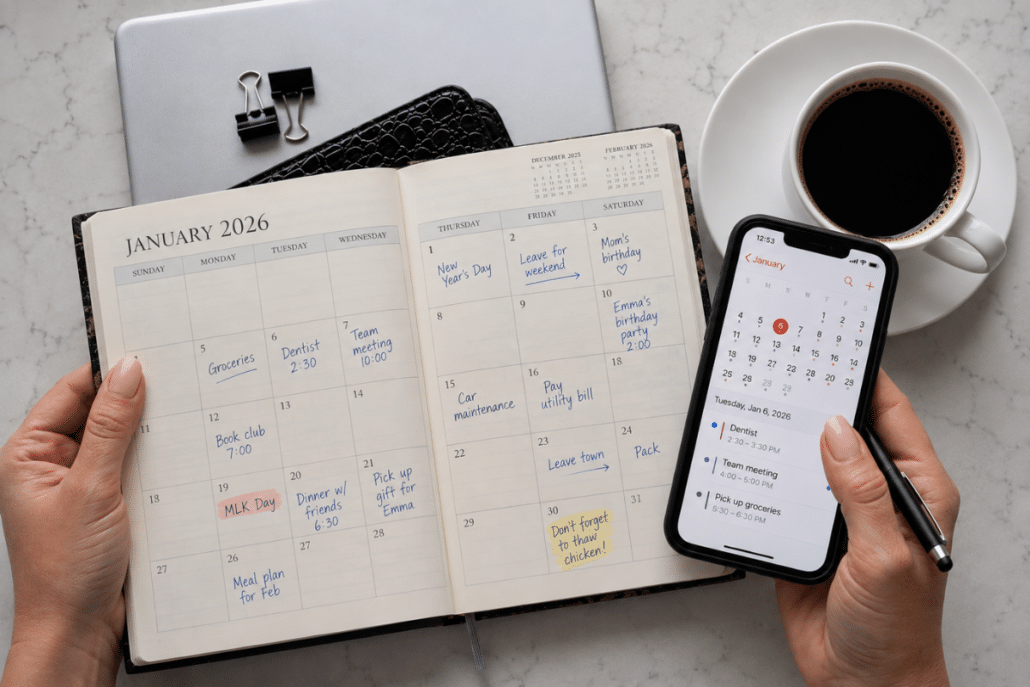
Paper or Digital Calendar? Turns Out, You May Need Both

Paper calendar or digital? I asked EC readers that question expecting a pretty even split. Instead, nearly 80% of respondents said they still use paper in some form, and the biggest group uses both. That sent me looking for the reason. Turns out, research suggests paper and digital calendars may each do something particularly well. The trick isn’t choosing one. It’s giving each one the right job.
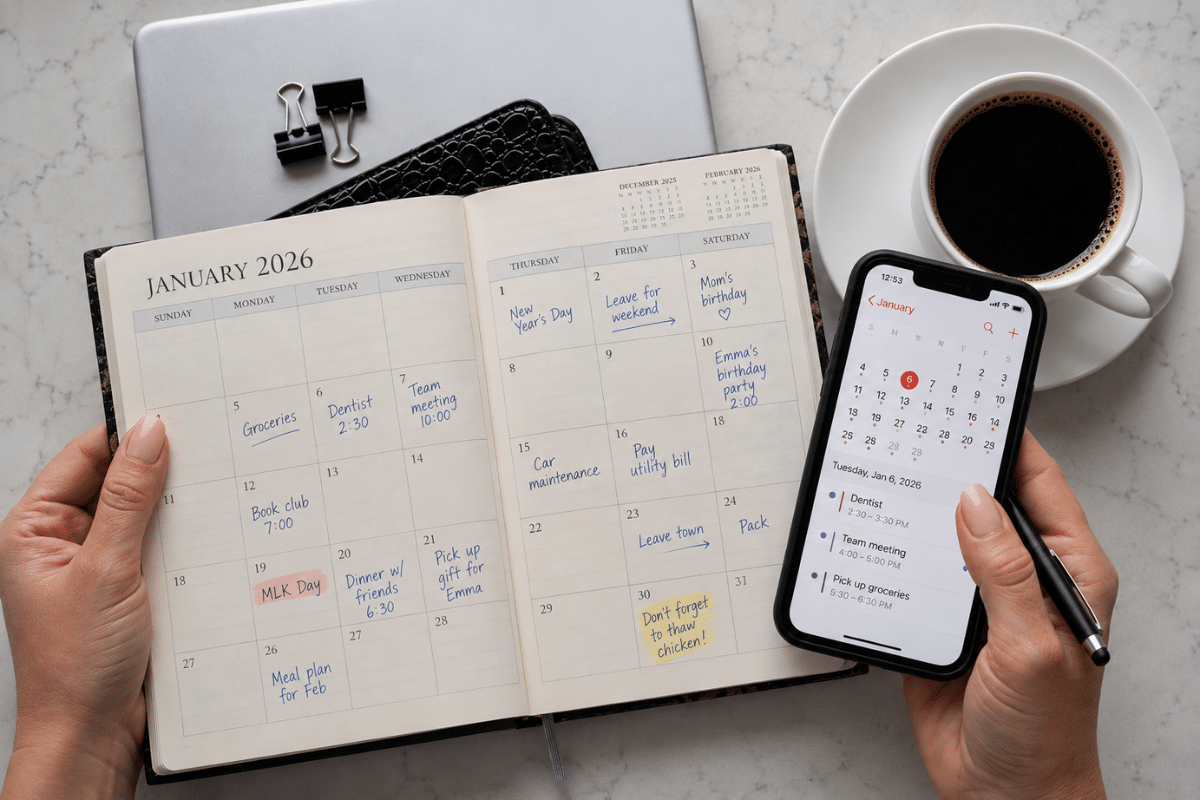
I asked EC readers a very important question recently: Paper calendar or digital?
I expected a fairly even fight. Maybe digital would pull ahead. After all, our phones can remind us where we’re supposed to be, tell us when to leave and alert us ten minutes before an appointment we’ve known about for six months.
Turns out, paper isn’t going anywhere.
Nearly 750 of you answered my very informal poll. Only 16.4% said you rely entirely on digital. Another 38.9% are firmly Team Paper. But the biggest group surprised me: 40.4% use both. Nearly 80% of respondents use paper in some form.
I’d tossed in one answer mostly for fun: “Both, because I trust no single system.” Apparently not such a joke.
Which got me wondering: With a perfectly capable calendar living right there on our phones, why are so many of us still reaching for a pen?
Turns out, researchers have wondered about that, too.
Paper helps you see the bigger picture
Researchers conducted three studies comparing how people plan with paper calendars versus mobile calendars. Their work, published in the Journal of Consumer Psychology, found that people using paper calendars made better plans and were more likely to follow through.
But here’s where it gets interesting. The advantage wasn’t simply that they wrote things down by hand. Paper encouraged people to look at their schedules from a broader perspective.
In plain English? Paper made it easier to see the whole picture.
Think about what happens when you open the calendar on your phone. You see today, maybe a few days. Switch to the month view and it’s a grid of tiny dots that tell you something is happening but not what.
Paper lays it all out. Dentist Tuesday. Dinner with friends Wednesday. School event Thursday. Leaving town Friday. Suddenly adding one more thing on Thursday doesn’t look quite so harmless.
Even more interesting, when researchers encouraged mobile-calendar users to take that broader view, their planning improved, too.
So this isn’t Paper Good, Phone Bad. Thank goodness. I wasn’t prepared to give mine up.
It’s about being able to see enough of your life at once to make a good decision about it. And that changes the question.

Maybe we’re asking the wrong question
Paper or digital, which is better? I don’t think that’s the most useful thing to ask. A better one is: What is each one better at?
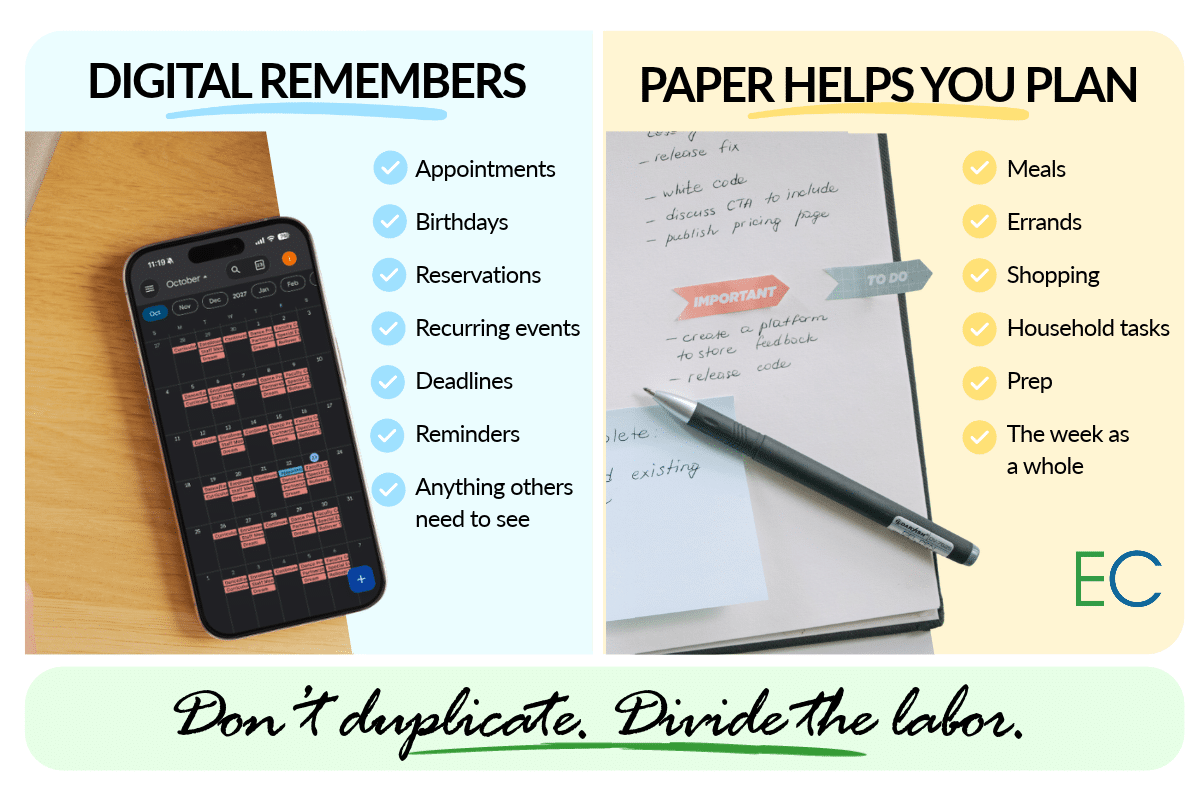
Digital is awfully good at remembering things. Appointments, birthdays, recurring events, reservations, deadlines. Anything that needs an alert or that another person needs to see. And your phone is usually with you.
When the receptionist asks if Tuesday the 17th at 2:30 works, your kitchen wall calendar isn’t going to help. Round one goes to digital, easily.
Paper does something else. It helps you stand back and plan around what you’ve already committed to. Which brings me to a simple rule.
Don’t duplicate. Divide the labor.
The obvious problem with using both? Now you’ve got two calendars to maintain. Wonderful. We solved an organization problem by creating a chore. No, thank you.
Don’t keep two identical calendars. Give each one a job. Let digital remember. Let paper help you plan.
Your digital calendar can be the permanent home for appointments, events and commitments. Your paper calendar becomes the working view of what’s ahead. Once a week, pull up your digital one and sketch the coming week on paper. That’s it.
And please don’t turn this into an art project unless art projects make you happy. You don’t need special stickers or six coordinating pens. And you most certainly don’t need to spend $38 on a planner before you’re allowed to get organized.
Use a wall calendar. A notebook. A printed weekly page. The back of an envelope that arrived in the mail. We’re planning Tuesday, not preserving it for future generations.
Now look at your actual week. What’s for dinner? Which errands can share a trip? When does that birthday gift need to be bought? What needs to happen before you leave town? Which night is already so ridiculous that adding one more thing would be asking for trouble?
That’s where paper earns its keep.
Your calendar can save you money, too
This is the part I think we overlook. A calendar isn’t just about getting somewhere on time. It’s an early-warning system.
Say Wednesday is packed from morning until night. That’s useful to know on Sunday.
You can line up leftovers or an easy weeknight dinner instead of discovering at 5:47 Wednesday afternoon that everyone’s hungry, you’re exhausted and takeout suddenly sounds like the greatest invention since indoor plumbing.
You notice three errands in the same part of town? One trip instead of three.You see Saturday’s birthday party while there’s still time to buy a gift without paying extra to get it there tomorrow.
You’re leaving town Friday, so perhaps Wednesday isn’t the day to stock the fridge with enough fresh produce to open a salad bar.
And there’s that bill due next week.
Seeing what’s coming gives you choices. And choices made early are almost always a lot cheaper than decisions made in a panic.
Wait, am I still writing things twice?
A little. But you’re not maintaining two permanent calendars. You’re looking at one while you plan from it, which is worth doing anyway.
Your paper page doesn’t need every detail. You don’t need the dentist’s address, phone number and confirmation code copied into Tuesday’s square. “Dentist 2:30” will do.
The point isn’t duplication. It’s perspective.
What if paper already works for me?
Then keep using it! This isn’t an eviction notice for your wall calendar.
If paper works beautifully for you and you don’t need shared calendars, alerts or access away from home, there’s no rule saying you need to digitize your life because everyone else has. Maybe put a few can’t-miss appointments in your phone for reminders. Or don’t.
The best system is still the one you’ll actually use.
What if I’m completely digital?
You don’t have to change that, either. In fact, the research gives digital devotees an encouraging clue: The advantage appears to come from taking a broader view of your schedule, not from paper having some mysterious organizational superpower.
So try deliberately zooming out. Once a week, pull up the widest useful view of your calendar and really look at what’s coming. Or grab a piece of paper and jot down the week.
Not because paper is magical. Because sometimes your brain needs to see Wednesday sitting next to Thursday before it realizes you’ve lost your mind.
Once you’ve mapped out the week, a quick Sunday prep routine can take care of the little things that otherwise have a habit of becoming Monday-morning emergencies.
Before you buy a planner, try this
If this hybrid idea sounds promising, don’t go shopping. Please.
Give it two weeks with something you already own. Keep appointments wherever you normally keep them. Then once a week, spend five or ten minutes looking ahead on paper. Add meals, errands, household tasks and whatever else has to fit around those commitments.
Then pay attention. Did you catch a conflict sooner? Plan dinner better? Combine a couple of errands? Remember something before it became an emergency? If so, you’ve learned something useful about how you plan.
Then decide whether a planner would make it easier.
Maybe the 40.4% of you using both have been onto something all along. You don’t have to choose between paper and digital. You just need each one to earn its place.
Let digital remember. Let paper help you plan.
Question: Which keeps your life together better: paper, digital or a little of both? Tell us in the comments below.

More from Everyday Cheapskate
 https://www.everydaycheapskate.com/wp-content/uploads/20261017-Woman-opening-refrigerator-stocked-with-fresh-food-and-condiments.png
800
1200
Mary Hunt
https://www.everydaycheapskate.com/wp-content/uploads/EC-Logo-by-Mary-Hunt-Tagline-Trimmed.png
Mary Hunt2026-10-17 12:16:242026-10-17 12:16:24What Temperature Should a Refrigerator and Freezer Be?
https://www.everydaycheapskate.com/wp-content/uploads/20261017-Woman-opening-refrigerator-stocked-with-fresh-food-and-condiments.png
800
1200
Mary Hunt
https://www.everydaycheapskate.com/wp-content/uploads/EC-Logo-by-Mary-Hunt-Tagline-Trimmed.png
Mary Hunt2026-10-17 12:16:242026-10-17 12:16:24What Temperature Should a Refrigerator and Freezer Be? https://www.everydaycheapskate.com/wp-content/uploads/20261012-Woman-using-smartphone-while-checking-monthly-cellular-data-usage-on-laptop.png
800
1200
Mary Hunt
https://www.everydaycheapskate.com/wp-content/uploads/EC-Logo-by-Mary-Hunt-Tagline-Trimmed.png
Mary Hunt2026-10-12 10:51:112026-10-12 10:51:11Do You Really Need Unlimited Data? Check Before You Pay
https://www.everydaycheapskate.com/wp-content/uploads/20261012-Woman-using-smartphone-while-checking-monthly-cellular-data-usage-on-laptop.png
800
1200
Mary Hunt
https://www.everydaycheapskate.com/wp-content/uploads/EC-Logo-by-Mary-Hunt-Tagline-Trimmed.png
Mary Hunt2026-10-12 10:51:112026-10-12 10:51:11Do You Really Need Unlimited Data? Check Before You Pay https://www.everydaycheapskate.com/wp-content/uploads/20261011-Woman-Adjusting-Smart-Home-Device-on-the-Wall-how-to-lower-your-electric-bill.png
800
1200
Mary Hunt
https://www.everydaycheapskate.com/wp-content/uploads/EC-Logo-by-Mary-Hunt-Tagline-Trimmed.png
Mary Hunt2026-10-11 23:01:562026-10-11 23:01:56Stop Chasing Pennies on Your Electric Bill. Do This
https://www.everydaycheapskate.com/wp-content/uploads/20261011-Woman-Adjusting-Smart-Home-Device-on-the-Wall-how-to-lower-your-electric-bill.png
800
1200
Mary Hunt
https://www.everydaycheapskate.com/wp-content/uploads/EC-Logo-by-Mary-Hunt-Tagline-Trimmed.png
Mary Hunt2026-10-11 23:01:562026-10-11 23:01:56Stop Chasing Pennies on Your Electric Bill. Do This https://www.everydaycheapskate.com/wp-content/uploads/20261007-red-present-sitting-in-autumn-leaves-Amazon-Prime-Big-Deal-Days-gifts.png
800
1200
Mary Hunt
https://www.everydaycheapskate.com/wp-content/uploads/EC-Logo-by-Mary-Hunt-Tagline-Trimmed.png
Mary Hunt2026-10-06 23:09:432026-10-06 23:09:43Christmas Shopping in October? These Prime Day Gifts Make Sense
https://www.everydaycheapskate.com/wp-content/uploads/20261007-red-present-sitting-in-autumn-leaves-Amazon-Prime-Big-Deal-Days-gifts.png
800
1200
Mary Hunt
https://www.everydaycheapskate.com/wp-content/uploads/EC-Logo-by-Mary-Hunt-Tagline-Trimmed.png
Mary Hunt2026-10-06 23:09:432026-10-06 23:09:43Christmas Shopping in October? These Prime Day Gifts Make Sense https://www.everydaycheapskate.com/wp-content/uploads/20261006-prime-big-deal-days-have-landed.png
800
1200
Mary Hunt
https://www.everydaycheapskate.com/wp-content/uploads/EC-Logo-by-Mary-Hunt-Tagline-Trimmed.png
Mary Hunt2026-10-05 11:01:432026-10-07 09:02:53EC’s Top Picks from Amazon Prime Big Deal Days 2026
https://www.everydaycheapskate.com/wp-content/uploads/20261006-prime-big-deal-days-have-landed.png
800
1200
Mary Hunt
https://www.everydaycheapskate.com/wp-content/uploads/EC-Logo-by-Mary-Hunt-Tagline-Trimmed.png
Mary Hunt2026-10-05 11:01:432026-10-07 09:02:53EC’s Top Picks from Amazon Prime Big Deal Days 2026 https://www.everydaycheapskate.com/wp-content/uploads/20261004-reduce-healthcare-costs-with-three-habits-healthy-couple-walking-in-autumn-leaves.png
800
1200
Mary Hunt
https://www.everydaycheapskate.com/wp-content/uploads/EC-Logo-by-Mary-Hunt-Tagline-Trimmed.png
Mary Hunt2026-10-04 23:08:572026-10-04 23:09:47How to Reduce Healthcare Costs With 3 Free Daily Habits
https://www.everydaycheapskate.com/wp-content/uploads/20261004-reduce-healthcare-costs-with-three-habits-healthy-couple-walking-in-autumn-leaves.png
800
1200
Mary Hunt
https://www.everydaycheapskate.com/wp-content/uploads/EC-Logo-by-Mary-Hunt-Tagline-Trimmed.png
Mary Hunt2026-10-04 23:08:572026-10-04 23:09:47How to Reduce Healthcare Costs With 3 Free Daily Habits https://www.everydaycheapskate.com/wp-content/uploads/20261004-woman-dreaming-about-her-financial-and-life-goals.png
800
1200
Mary Hunt
https://www.everydaycheapskate.com/wp-content/uploads/EC-Logo-by-Mary-Hunt-Tagline-Trimmed.png
Mary Hunt2026-10-04 12:50:422026-10-04 12:50:42She Lived in a Basement for $100 a Month. Here’s Why.
https://www.everydaycheapskate.com/wp-content/uploads/20261004-woman-dreaming-about-her-financial-and-life-goals.png
800
1200
Mary Hunt
https://www.everydaycheapskate.com/wp-content/uploads/EC-Logo-by-Mary-Hunt-Tagline-Trimmed.png
Mary Hunt2026-10-04 12:50:422026-10-04 12:50:42She Lived in a Basement for $100 a Month. Here’s Why. https://www.everydaycheapskate.com/wp-content/uploads/20241004-news-you-can-use-october-everyday-cheapskate-top-news-articles.png
800
1200
Mary Hunt
https://www.everydaycheapskate.com/wp-content/uploads/EC-Logo-by-Mary-Hunt-Tagline-Trimmed.png
Mary Hunt2026-10-04 01:04:052026-10-23 09:46:06News You Can Use • October 2026
https://www.everydaycheapskate.com/wp-content/uploads/20241004-news-you-can-use-october-everyday-cheapskate-top-news-articles.png
800
1200
Mary Hunt
https://www.everydaycheapskate.com/wp-content/uploads/EC-Logo-by-Mary-Hunt-Tagline-Trimmed.png
Mary Hunt2026-10-04 01:04:052026-10-23 09:46:06News You Can Use • October 2026 https://www.everydaycheapskate.com/wp-content/uploads/20261003-woman-hugging-elderly-mother-sandwich-generation-caring-for-aging-parents.png
800
1200
Mary Hunt
https://www.everydaycheapskate.com/wp-content/uploads/EC-Logo-by-Mary-Hunt-Tagline-Trimmed.png
Mary Hunt2026-10-03 10:47:222026-10-03 10:47:25Sandwiched Between Aging Parents and Adult Children
https://www.everydaycheapskate.com/wp-content/uploads/20261003-woman-hugging-elderly-mother-sandwich-generation-caring-for-aging-parents.png
800
1200
Mary Hunt
https://www.everydaycheapskate.com/wp-content/uploads/EC-Logo-by-Mary-Hunt-Tagline-Trimmed.png
Mary Hunt2026-10-03 10:47:222026-10-03 10:47:25Sandwiched Between Aging Parents and Adult Children
My husband is digital while I actually have a double paper system- a 6×8 booklet weekly/daily planner and a desktop regular calendar. My system is color coded as in grandkids/orange, medical/pink, etc. I can glance quickly at my desktop calendar and see by color what’s coming up. Then, specifics are in my booklet. Makes life easy on the hubby and me.
When I first got my smartphone, I was using a pocket calendar and decided to do both. That was a mess, either it was on one, but not the other or I didn’t have the one I needed with me at the time, so I decided to put everything on my phone…which is synced to my laptop. Works great. I still look at the calendar for a week or month view regularly. What ever works for you is the way to go!
I use both. Because when I’m scheduling an appointment I can stay on my phone and look at the paper one. I don’t like having to go back on my phone from call to calendar. I can stay on the phone and see the whole picture.
When my husband and I were both working we would sit down once a week to coordinate our Date Books. Then we got smart phones and use a calendar that we have set to coordinate. When I put something on the calendar, it immediately goes on his calendar. We are no longer working, so the items we add are mostly weekly Bible Study, home maintenance appointments, and lots of doctor appointments. Every entry is color coded so we can see at a glance what is on the schedule. Since we adopted this system we have not had one conflict! When I put a doctor appointment on the calendar the first word I type is the name of the person who has the appointment followed by the doctor, then the reason for the appointment. For example Sara – Dentist – Cleaning and this is coded in Tangerine. There was one week our family of 3 had a total of 14 doctor appointments – 5 in one day. If we have to have labs drawn before an appointment, at the time I make the appointment, I put Labs for Dr Soandso and labs are always coded in Tomato – bright red. We each have our own color for our personal appointments. For example my hair appointments, and Ladies Bible study, take Marianne grocery shopping, etc are all in Grape. My husband’s Deacon Meetings, and other personal engagements are in Lemon. I also include the location information for appointments. By using this system I can look at my calendar at a glance and know who has something scheduled for any given day. The best part is that everything is added to both of our calendars in an instant. We have gone paperless for almost everything in our lives. Anything worth keeping is scanned into the computer and the document is shredded. My husband backs up all of the data on both of our computers to an external drive which he stores in our Safe Deposit Box at the bank. You may be surprised to know that I am 79 and my husband is 81. We didn’t grow up in the digital age.
I use paper calendar for weeks and months, and post-it notes on cabinet door for each day of coming week. Birthdays and anniversaries are tracked electronically.
I definitely use both and I have a daily paper to-do list. My wall calendar is in easy view of the fridge so I look it over as I fill water bottles. It helps keep the weekly schedule in perspective. And my phone calendar is awesome for scheduling on the fly. My husband and daughter also share things to the digital calendar, so in theory we all know what the others have scheduled.